// process / how i diagnose
How I diagnose a WordPress site before I touch anything
If you've got here from an Upwork proposal, this is what happens before any fix: what I need from you, what I check and in what order, and what you get back. I'm one person (here's who), so the one who diagnoses your site is the one who fixes it. Book a call when you're ready to start.

What do I need from you to start?
Three things, and the diagnosis itself only needs the first two. First time here? Tell me what's wrong with the site, and I'll say which of these I need.
Your site's URL
That's enough for me to look at the public side: robots.txt, sitemaps, the rendered HTML, the schema and the page speed field data Google already publishes.
Read-only Search Console access
A restricted user on your property. It lets me read performance and indexing data and change nothing. It takes you about two minutes, and you can remove it any time.
WordPress access, later
Only once there's an agreed fix, and on a staging copy where your host offers one. The diagnosis itself doesn't need your password.
How do I diagnose a WordPress site, step by step?
Always in this order, because each step narrows what the next one has to look at. Nothing on your site changes during any of it.
- i.
Take a Search Console baseline
I export 16 months of the Performance report by page and by query, and note the date range. Every later number gets compared against this, so nothing is judged on memory or on a hunch.
- ii.
Read the Page indexing report
Every URL Google leaves out is grouped by its status, like Crawled, currently not indexed or Duplicate, Google chose different canonical than user, and each group is traced to the WordPress setting, plugin or template that creates it. URL Inspection on a sample from each group confirms what Google actually fetched.
- iii.
Crawl the site the way Google does
Screaming Frog, set to render JavaScript, compared against the source HTML. That's where status codes, broken links, redirect chains, wrong canonicals, orphan pages, duplicate titles, missing headings and thin templates show up, along with the site architecture and crawl budget waste the XML sitemaps don't reveal.
- iv.
Check field data, not a lab score
The Core Web Vitals report and the CrUX data behind PageSpeed Insights, read by URL group. A green Lighthouse score on one test run isn't what Google ranks on.
- v.
Read what WordPress is actually outputting
The theme, the SEO plugin (Yoast, Rank Math, AIOSEO or SEOPress), the page builder, the caching plugin and WooCommerce each write into your HTML, robots.txt, sitemap and schema. Conflicts between them are the most common WordPress fault I find, and the Rich Results Test shows whether the structured data they print is valid or duplicated.
- vi.
Rank the findings by clicks at stake
Each finding is tied to a page and a number in your own Search Console. Pages on page one or two with weak click rates get top priority. Cosmetic warnings go to the bottom or off the list.
What do you get back from the diagnosis?
A written list of findings, usually within a day. Each one names the page or template, what's wrong, the Search Console number that shows what it's costing, and the fix. There's no score out of 100, because a score can't tell you which problem is losing you money.
If I can't tie a finding to a number in your own data, it doesn't go on the list. That keeps the list short, and it means you can check every line yourself in Search Console.
What has a diagnosis found on real client sites?
Three findings from the case studies, each one invisible from the front end and obvious in the data.
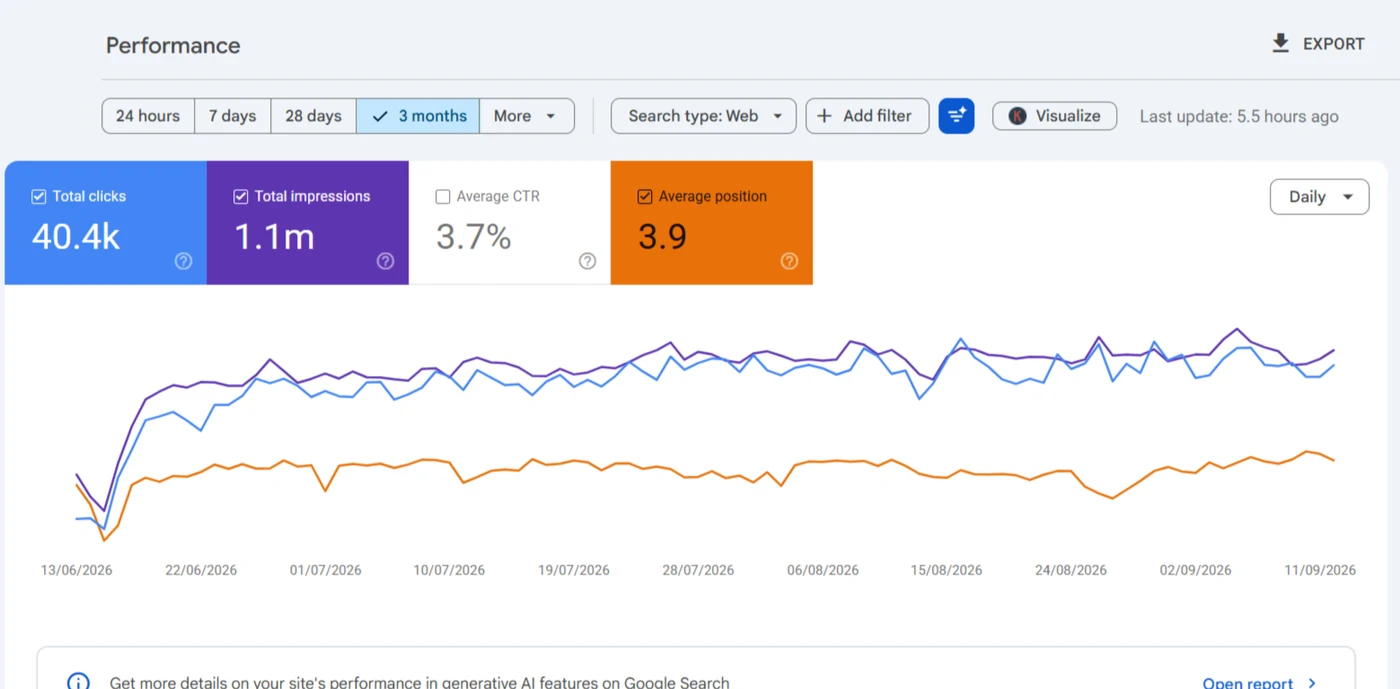
A redesign had changed URLs with no redirect map. The daily view in Search Console showed the exact days, and redirects had it back to 362 clicks a day by 20 June.
Read the case study →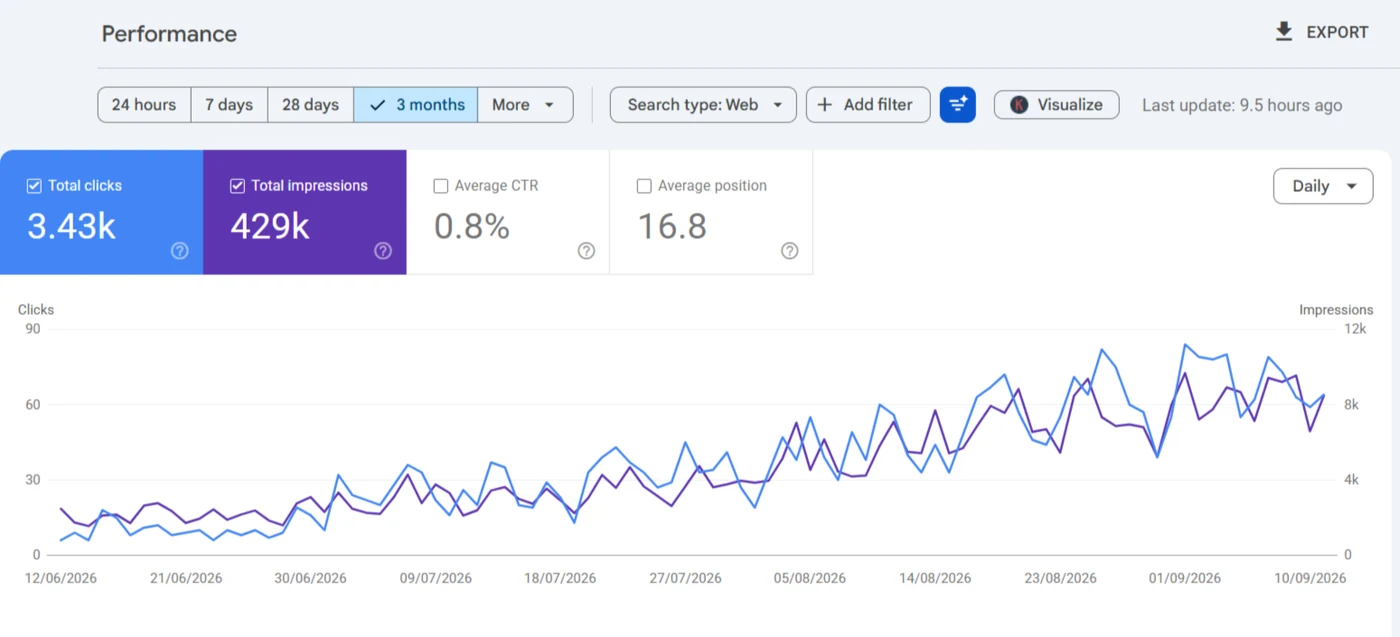
An Lpagery template page, /region_name/, was live and indexable with placeholder text for its title, next to a duplicate Edinburgh page. A crawl finds that in minutes; nobody sees it by browsing.
Read the case study →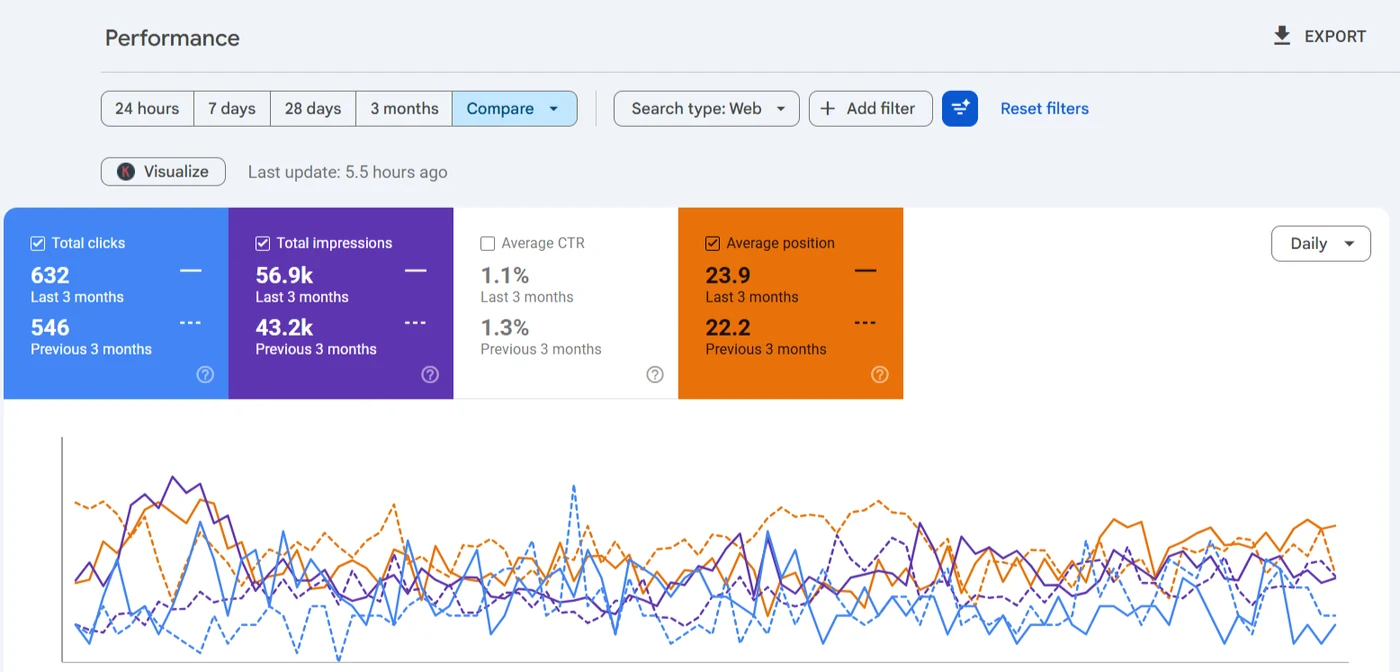
Search Console's page report listed the www and non-www homepage separately, with ranking signals split across both addresses.
Read the case study →How are the fixes done, and when can you judge them?
You decide which findings get fixed and in what order. I make one change per page per window, on staging where your host offers it, so when something moves in Search Console it's clear what moved it. Changing ten things at once makes every result a guess.
I allow four to eight weeks before anything gets judged. Google's starter guide says some changes show in a few hours and others take several months, so that's the window where I read a first result, not a promise about Google's pace. The report compares clicks, impressions and position per changed page against the baseline from step one.
What's included, and what won't I do?
WordPress and WooCommerce technical work and the website side of local SEO, done by one person. Everything on the right-hand list goes to someone else, and every service is listed on the services page.
Diagnosed and fixed
- Crawling, indexing, canonicals, robots.txt and sitemaps
- Core Web Vitals and WordPress speed, judged on field data
- Page builders and JavaScript rendering
- Duplicate content, thin pages and keyword cannibalization
- Schema, WooCommerce, migrations and traffic drop recovery
- AI search readiness: what AI crawlers can reach and read
- Local SEO: the website and Business Profile made to agree
Not my job
- Link building, guest posts and outreach
- Ongoing Business Profile posts, photos and review replies
- Paid ads
- Web design and build work
- Anything that isn't WordPress or WooCommerce
- Ranking guarantees of any kind
What do clients ask before booking?
Do you need my WordPress password to diagnose the site?
No. The diagnosis runs on your URL and read-only Search Console access. WordPress access only comes up once there's an agreed fix, and I'd rather work on a staging copy when your host offers one. Here's what I do with your Search Console data.
How long does the diagnosis take?
Findings usually come back within a day for a typical WordPress site. A large WooCommerce catalogue takes longer to crawl, and I'll tell you up front if that's the case.
What if you don't find anything worth fixing?
Then I'll say so in writing, and you won't pay for being told your site is fine. I'd rather lose the job than sell work your site doesn't need.
Can I hand the findings to my own developer?
Yes. Each finding says what's wrong, where it is, what it's costing and what fixes it, so a WordPress developer can act on it without me.

Ready for the diagnosis? Book a call.
Reply to the proposal or book a call on Upwork with your site and read-only Search Console access. You'll get the findings back in writing, ranked by what each one is costing in clicks.
Book a call on Upwork