// services / crawling and indexing
Technical SEO audit services for WordPress, ranked by clicks
Book a call, share read-only Search Console access, and I'll run a WordPress SEO audit of your site or WooCommerce store the way Google reads it. You'll get a short fix list ranked by the clicks each fault costs.

// what it costs
- US$149Deep audit and growth report, one off, on Upwork
- US$999Audit and fixes, one off, on Upwork
- US$299 or US$750month to month, with a report every month
Audits from US$149, audit and fixes from US$999, and month to month plans at US$299 for maintenance or US$750 for growth. Booked and paid on Upwork.
What do you get from my technical SEO audit services?
My technical SEO audit services end in a written audit report, from one technical SEO audit consultant, not a sales team. A WordPress SEO audit here is a report on what stops Google crawling, indexing or choosing your pages, and what each fault costs in clicks. It's built from Google Search Console data and a full crawl, not a plugin's traffic lights.
If you'd like the plain-English version of what technical SEO covers first, how I explain technical SEO to business owners is the short read. Running a Calgary business? The Calgary technical SEO audit page has the local pack data too.
A ranked fix list
Findings sorted by the clicks on the pages they touch, so the first fix is worth the most.
Indexing, explained
Every Page indexing reason with real volume, traced to a setting, plugin or template. The two owners ask about most have a guide of their own: why Google leaves pages discovered but not indexed.
Speed and links
Core Web Vitals field data, and whether internal linking points at the pages that should rank.
How would I diagnose this on your site?
This is the order I check it in on a WordPress or WooCommerce site, before changing anything. You'll get the findings back in writing, each tied to a number in your own Search Console.
See my full diagnosis process- i.
The Pages tab against a full crawl
Search Console by page next to a full crawl, so split hosts, -2 copies and stray template URLs show first.
- ii.
Indexing reasons with real volume
Sample URLs in URL Inspection's live test show whether the fault sits in a setting, plugin or template.
- iii.
The response Google gets
Status codes, X-Robots-Tag headers and the canonical actually printed, which a second plugin can overrule.
Want your site's faults found and ranked by what they cost?
Book a call on UpworkWhich faults does a WordPress SEO audit usually find?
These four turn up most, and they're usually cheap to fix. If the damage sits in the Page indexing report, the follow-on job is crawlability and indexing.
| Fault | Where Search Console shows it | Usual WordPress cause |
|---|---|---|
| Noindex on pages that should rank | Excluded by 'noindex' tag | Search engine visibility ticked, or a post type hidden in Yoast |
| Old URLs returning 404 | Not found (404) | Slugs changed without redirects |
| One page at two addresses | Two URLs for the same page in the Pages tab | www and non-www both answering, or a -2 copy |
| Template pages published by accident | Odd titles in the Pages tab | Page generator plugins left public |
What has a technical SEO audit caught on real sites?
Two faults an audit exists to catch, including the template page on Scrap a Vehicle that went live by accident.
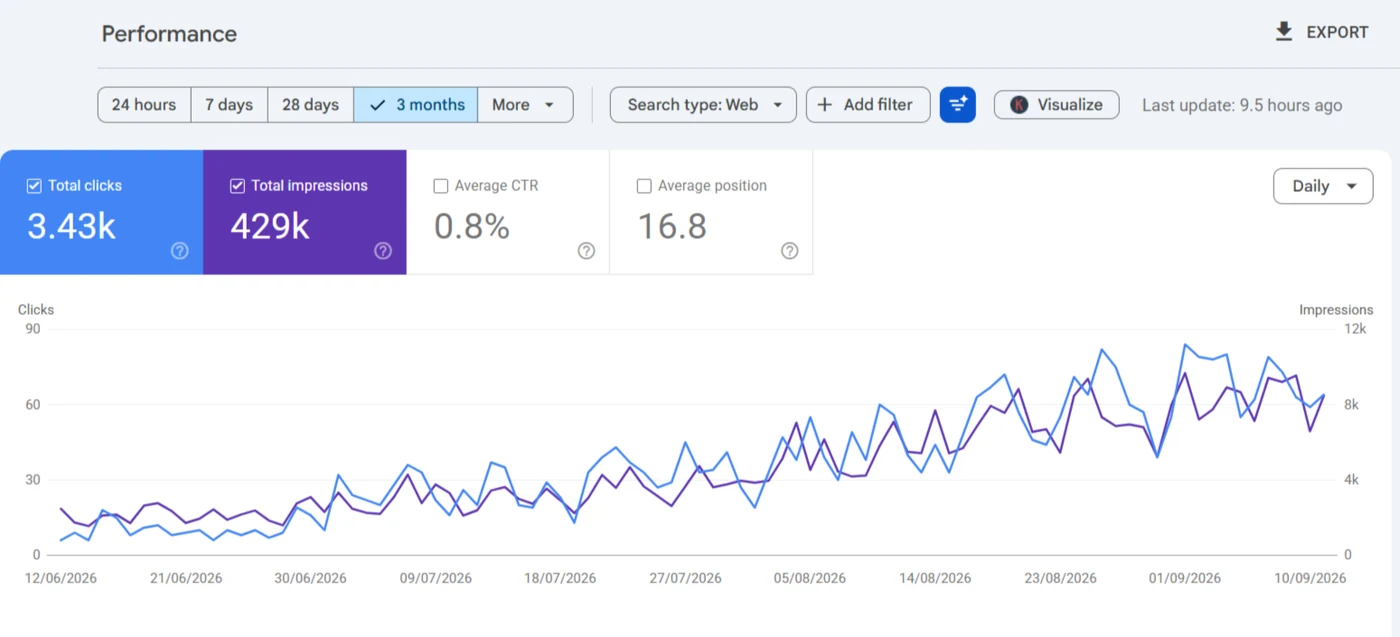
The /region_name/ template page and a duplicate Edinburgh page. Only a crawl of every published URL finds these.
Read the case study →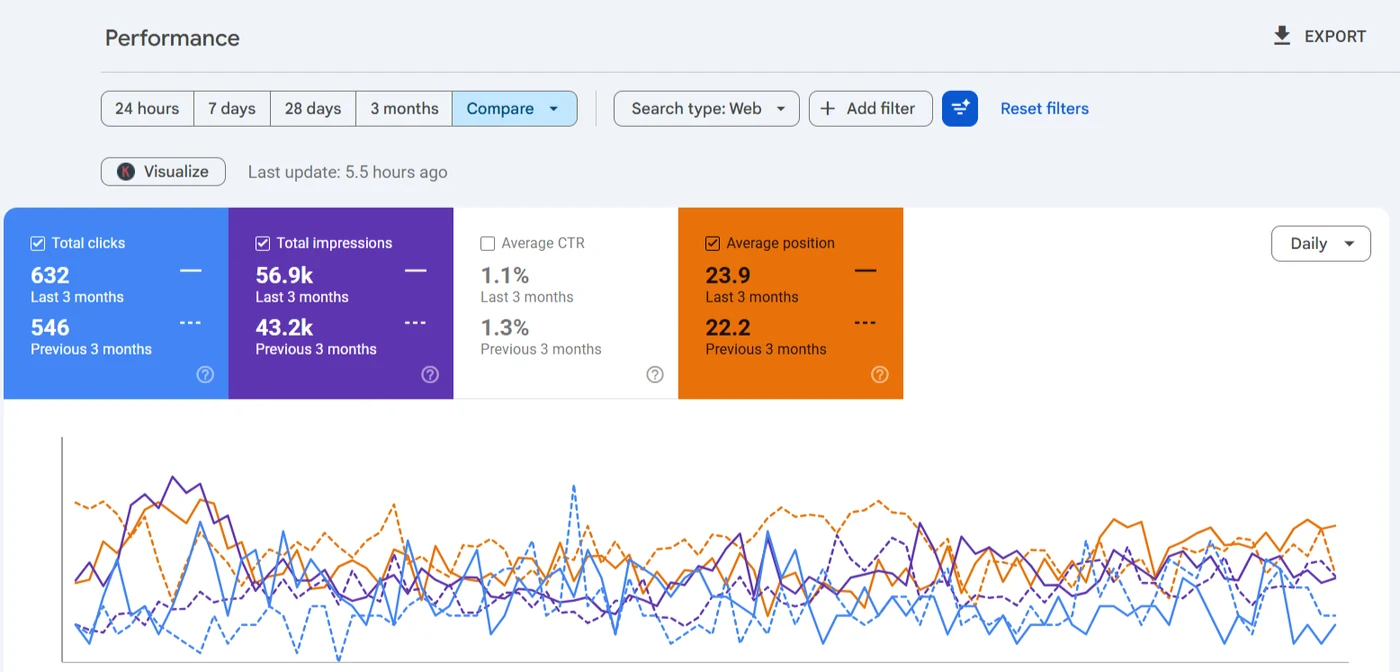
Non-www at 12,294 impressions and position 13.2, www at 11,180 and 5.3, split in the Pages tab.
Read the case study →What does the audit check, layer by layer?
Every layer below gets checked on every audit, with the tool that reads it named, so you can repeat any finding yourself. When the content quality row turns up dozens of thin or competing pages, the follow-on job is my content audit services, which decide what to keep, merge or prune. The last row is where the audit hands over to AI search readiness when answer engines matter to you.
| Layer | What I check | Read with |
|---|---|---|
| Crawl access | robots.txt rules, status codes, redirect chains, sitemaps listing only indexable URLs | Screaming Frog, Crawl stats |
| Indexing | noindex, canonicals, and every excluded reason with real volume | Page indexing report, URL Inspection |
| Architecture | Crawl depth, orphan pages, archives and post types that shouldn't be public | A full crawl |
| On-page | Missing or duplicate titles, meta descriptions, one H1 per page, image alt text | A full crawl |
| Rendering and speed | What Googlebot renders, and LCP, INP and CLS from real users | Live test, PageSpeed Insights |
| Structured data | Errors, duplicate graphs from two plugins, markup that doesn't match the page | Rich Results Test |
| Content quality | Thin pages, duplicate copies and pages competing for one query | Performance report |
| Security and spam | Security issues, manual actions, and injected spam pages on a hacked site | Security issues report, site: search |
| AI crawler access | Whether robots.txt and the firewall let search and AI answer crawlers such as OAI-SearchBot reach the pages | The live robots.txt, server logs |
Why pay for an audit when a plugin gives you a free SEO score?
Because a score only grades the checks a tool knows. Yoast's traffic lights and Rank Math's analyzer can't see which pages Google declined to index, or which of 400 warnings is costing you money. I audit the response Google received, then tell you which fixes pay for themselves first.
What's included in the audit, and what's a separate job?
Slow templates are WordPress speed work, and a store's catalogue gets its own pass under WooCommerce SEO.
In the audit
- Page indexing reasons, sampled and explained
- robots.txt, sitemaps, canonicals and redirects
- Core Web Vitals and structured data
- A written fix list ranked by clicks
Separate, or not offered
- Making the fixes, in the $999 package or quoted from the list
- Link building, ads and web design
What happens after you book technical SEO audit services?
- i.
A short call about the site
What changed, what's worrying you and which pages make money. If an audit's the wrong fix, I'll say so.
- ii.
A fixed scope on Upwork
Templates and URL types set the scope, not page count, and you approve it first.
- iii.
Read-only access, then the audit
Search Console and the public site are enough, so no WordPress login's needed.
- iv.
The report and a walkthrough
The ranked list in writing, plus a recorded walkthrough.
What else do people ask about technical SEO audit?
How much do technical SEO audit services cost?
The audit is $149, the deep audit and growth report on the homepage and in the terms, and $999 gets the audit with every fix done. Price follows templates and URL types rather than page count, so a much larger store gets a written quote on Upwork after a short call, and it doesn't move once it's agreed.
How long does the audit take?
Findings usually come back within a day for a typical WordPress site. A large WooCommerce catalogue takes longer to crawl, and I'll tell you up front if that's the case.
How often should a site be audited?
Once properly, then after anything that changes URLs or templates: a redesign, a migration, a new theme or SEO plugin. Between those, a monthly look at the Page indexing and Core Web Vitals reports catches most new faults before they cost clicks.
Can ChatGPT or an audit tool do this instead?
They'll list generic warnings. Neither can read your Search Console, render your templates or tell which warning actually costs clicks, and that judgement is what you're paying for.
Do you need admin access to my WordPress site?
No. Read-only Search Console access and the public site are enough. A login only matters if you'd like me to make the fixes.
Will you fix the problems too?
If you want. I'll hand the list to your developer or make the fixes myself, one at a time with dates logged.
The audit's checks are written up as posts, so you can see what you're paying for before you book: the technical SEO checklist I run on WordPress, the crawl I run before I change anything and how I explain the findings in plain English. The rest sit with the WordPress setup posts.
If you're still comparing people, how I price SEO work and how I'd vet an SEO consultant sit with the hiring and pricing posts. For what comes after the audit, I've written up how I decide between a one-off project and a retainer, and how I choose between Rank Math and Yoast when the SEO plugin is part of the question.

Want your faults ranked by the clicks they cost?
Send me the URL and read-only Search Console access on Upwork. You'll get a short written list: what's broken, which pages it touches and what it's costing, with the uncomfortable findings left in.
Book a call on Upwork