// services / crawling and indexing
WordPress robots.txt service and sitemaps Google can actually read
My WordPress robots.txt service covers the two files Google reads first: the robots.txt your server actually serves and the sitemaps your SEO plugin actually generates. When Search Console says 'Sitemap could not be read', the cause is usually a rule, a firewall or an old sitemap address, not the sitemap itself. Book a call and I'll fetch your live files, then fix both.

// what it costs
- US$149Deep audit and growth report, one off, on Upwork
- US$999Audit and fixes, one off, on Upwork
- US$299 or US$750month to month, with a report every month
Audits from US$149, audit and fixes from US$999, and month to month plans at US$299 for maintenance or US$750 for growth. Booked and paid on Upwork.
What does 'Sitemap could not be read' mean in Search Console?
It means Google tried to fetch your sitemap and failed, so it read none of it. The Sitemaps report shows the row as Couldn't fetch, and the details page says Sitemap could not be read. That's a different problem from 'Sitemap can be read, but has errors', where Google got the file and only some entries failed.
Don't wait it out for weeks. Google's help page says that if a sitemap fetch fails, Google will try a few more times, but will eventually stop trying to read that sitemap. Some fetch errors are transient, so a short wait is fair; a status that's still there after that needs a cause found, then a resubmit.
How would I diagnose this on your site?
This is the order I check it in on a WordPress or WooCommerce site, before changing anything. You'll get the findings back in writing, each tied to a number in your own Search Console.
See my full diagnosis process- i.
The Sitemaps report's details page
Which fetch reason Google names, and whether the row says Couldn't fetch or has errors, which is a different fix.
- ii.
A live URL Inspection of the sitemap URL
Google's own debugging step: Crawl allowed should read Yes and Page fetch should read Successful. Anything else names the layer that's blocking it.
- iii.
The robots.txt served at the root, past the cache
Set against Search Console's robots.txt report, which replaced the old robots.txt Tester, it shows whether a physical file, the plugin or Cloudflare writes the rules Google reads.
- iv.
The Indexed, though blocked by robots.txt reason
Its URLs show which Disallow rules are hiding a noindex from Google.
Search Console says it couldn't fetch your sitemap?
Book a call on UpworkWhy can't Google read your WordPress sitemap?
Google's Sitemaps report help lists five reasons a fetch fails. On WordPress each one has a usual suspect, and that's the column I check first.
| Google's reason | What it looks like on WordPress | The fix |
|---|---|---|
| Blocked by robots.txt | A Disallow rule copied from an old tutorial, or a Cloudflare rule at the edge that no WordPress screen shows | Remove the rule, because Google respects robots.txt when fetching sitemaps |
| Wrong URL (404) | The old generator's address still submitted after a switch, such as /wp-sitemap.xml when Yoast or Rank Math now serves /sitemap_index.xml | Submit the address the Sitemap line in your live robots.txt names |
| Server or other general error | A firewall or security plugin challenging Googlebot, or a host timing out while a large sitemap builds | Let Googlebot through, then confirm it with a live URL Inspection |
| An unresolved manual action | Rare, and listed in the Manual actions report | Fix that first, because sitemaps aren't read while it's unresolved |
| Low crawl demand for the sitemap | A new or thin site that Google isn't in a hurry to fetch | Improve what the sitemap lists; resubmitting alone won't raise demand |
Which robots.txt is Google reading on your site?
Probably not the one you think. The file editor in Yoast SEO writes a physical file, Rank Math edits the virtual one WordPress generates on request, and Cloudflare can add rules at the edge that no WordPress screen shows. Those layers overwrite each other without telling you, so when I'm hired I skip every plugin screen and fetch the file served at your domain's root, then match it against Search Console's robots.txt report to see which copy Google last parsed.
If you'd rather understand the file than hand it over, my WordPress robots.txt guide covers the four default lines, every editing route and the tests, line by line. This page is for having me do it.
What is your robots.txt costing you right now?
Usually one copied rule. The classics I keep finding: a Disallow on /wp-content/ that stops Google rendering the page, a blocked /category/ path trapping archives as Indexed, though blocked by robots.txt, a Noindex: line Google hasn't honoured since 2019, and a staging Disallow: / nobody deleted at launch. The guide's rule-by-rule table shows each bad rule and what to write instead.
The service isn't that table. It's me reading your live file next to your crawl data, naming which rules are costing you crawls or rankings today, and rewriting them for your site rather than for a tutorial's example site.
Can robots.txt keep a page out of Google?
Not reliably. It controls crawling, not indexing, so a blocked URL with links pointing at it can still get indexed. To keep a page out, let crawlers reach it and set noindex in your SEO plugin; if you block it, Google won't see that noindex.
What do deliberate robots.txt files and sitemaps look like on live sites?
Details you can check yourself today, including the week that file was corrected in the GK Jewelers case study.
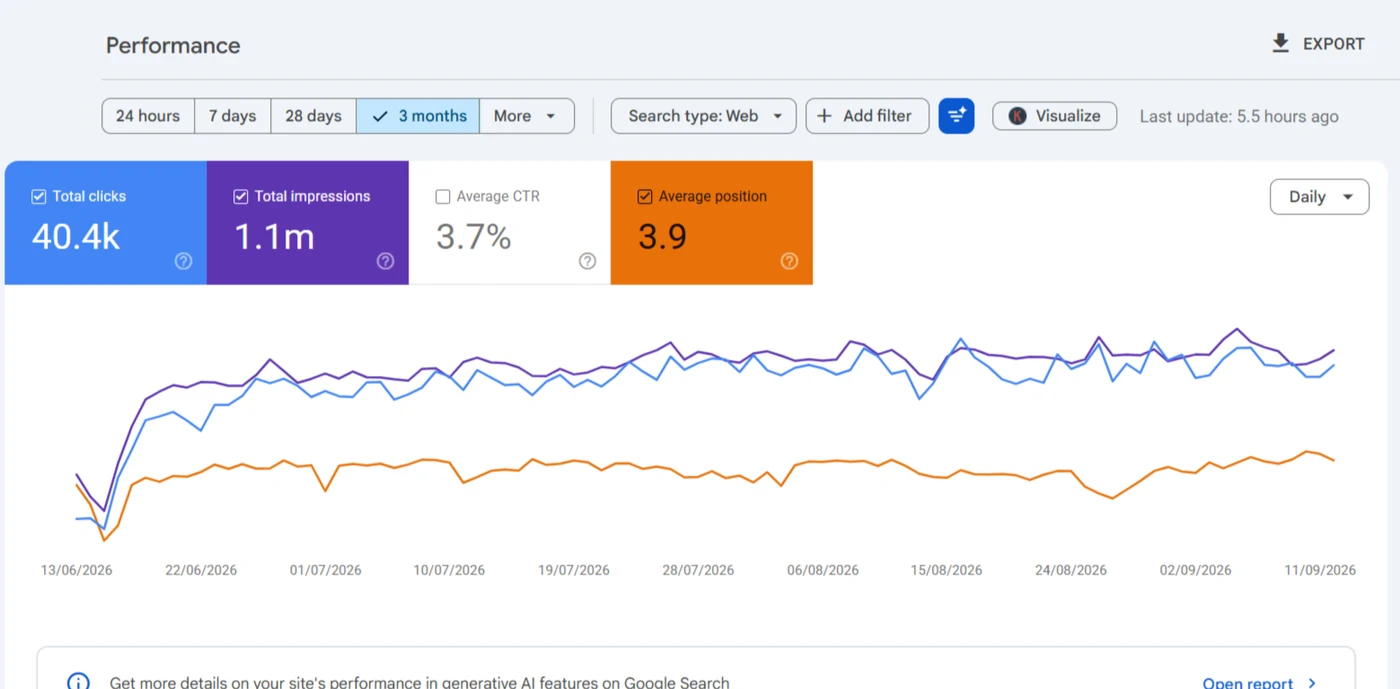
The live robots.txt still carries the header 'corrected, updated June 2026', so the next person knows why it looks the way it does.
Read the case study →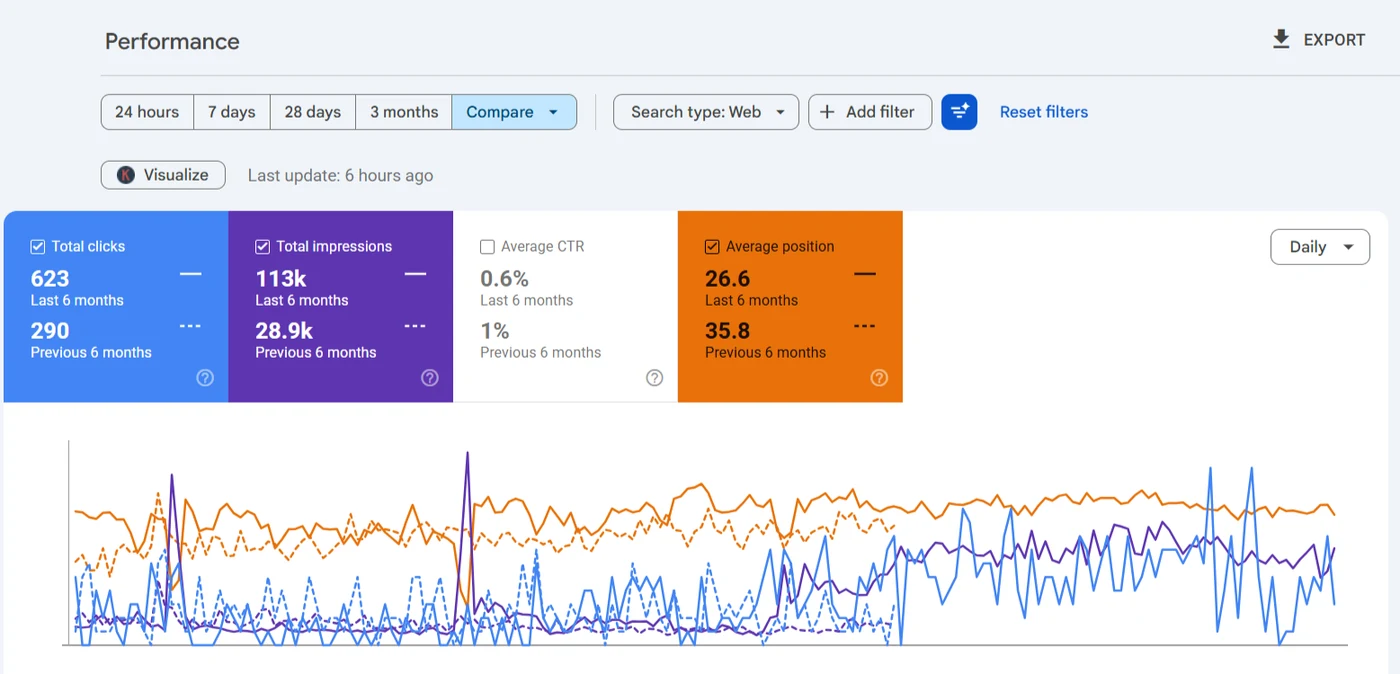
The live file lets AI answer and search engines in on purpose, and says so in the file itself.
Read the case study →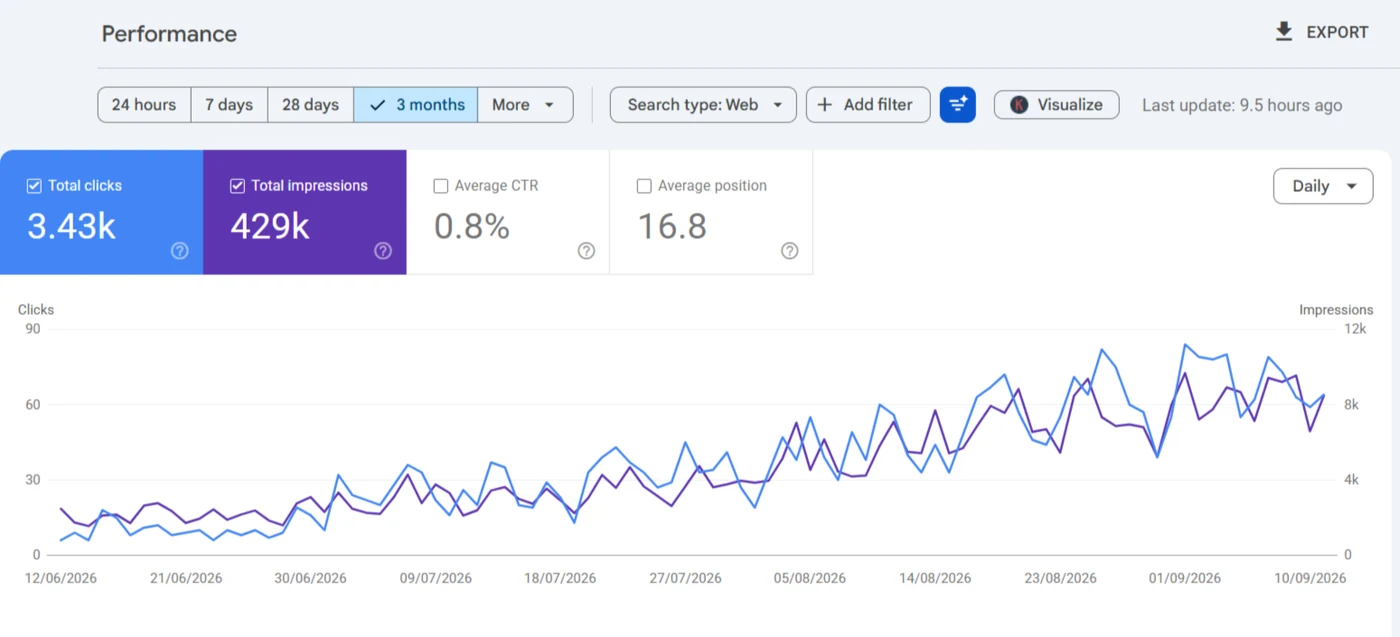
487 location pages split into small files, so each batch of towns reads on its own.
Read the case study →Is your XML sitemap helping, or just listing everything?
An XML sitemap still matters in 2026, mostly for new, deep or weakly linked pages. Google ignores priority and changefreq and only trusts lastmod when it's accurate, so what matters is which URLs are on the list.
Only URLs you want indexed
No redirects, noindexed pages or canonicalised copies. Each one listed is a mixed signal.
Split by content type
Products, categories and posts in separate files, each well under the 50,000 URL and 50MB limits, so the Page indexing report reads one type at a time.
One generator
Two plugins producing two sitemap indexes is common after a switch, and Google keeps reading both.
What's in a sitemap and robots.txt fix, and what's separate?
Testing whether AI systems can reach the site is AI search readiness, and pages still unindexed once the files are right go to crawlability and indexing. If Search Console files them as discovered or crawled but not indexed, it's the guide on why Google leaves pages discovered but not indexed that explains what each status means, and what it doesn't.
Included
- The Sitemaps report and a live URL Inspection read for every failing sitemap
- The live robots.txt read, and its source found
- Rules rewritten for WordPress, WooCommerce and your crawl data
- One sitemap generator, with non-indexable URLs kept out
- A written AI crawler policy inside the file
Separate
- Diagnosing why individual pages aren't indexed
- An hreflang sitemap for WPML or Polylang, under multilingual SEO
- Redirect maps for a domain change
What happens after you book the robots.txt and sitemap service?
- i.
The live files, fetched first
Your robots.txt and every sitemap Google knows, read before the call so it starts with facts.
- ii.
The generator behind each one
Physical file, SEO plugin or Cloudflare rule, because that's where the fix has to go.
- iii.
A short scope on Upwork
Rule and sitemap changes listed, quoted and approved before anything's edited.
- iv.
Resubmitted and watched
Sitemaps resubmitted in Search Console, then checked until the status reads Success.
What else do people ask about robots and sitemaps?
How much does the WordPress robots.txt service cost?
It's usually one of the smaller jobs, but a store with parameter rules and several generators takes longer, so there's no price here. You'll have a quote on Upwork after I've fetched the live files.
How do I check if my sitemap is working?
Open it in a browser first: it should load as XML with no login. Then paste its address into URL Inspection and run a live test. Google's help says you want Crawl allowed as Yes and Page fetch as Successful, and the Sitemaps report should then show Success.
Should I delete the sitemap and submit it again?
Only after fixing the cause. Google's help says to fix the problem and then resubmit; sending the same address while the block's still in place just brings the same status back.
How do I edit robots.txt in WordPress without a plugin?
Upload a plain text file named robots.txt to the root folder. It replaces the virtual file at once, so include the admin-ajax.php allow and your Sitemap line.
Where is the WordPress sitemap located?
That depends on what's generating it, which is exactly what I check first: core answers at /wp-sitemap.xml until an SEO plugin takes over at /sitemap_index.xml, and after a plugin switch it's common to find Search Console still holding the dead address.
Should a WordPress robots.txt block AI crawlers?
Only if you don't want AI answers citing you. OpenAI's OAI-SearchBot serves ChatGPT search while GPTBot collects training data, so a site can allow one and block the other.
When a robots rule or a sitemap is the suspect, I start with the URL Inspection tool, and fixing Excluded by noindex tag covers the tag people most often confuse with a robots.txt block. Setting up Search Console on WordPress is where the sitemap gets submitted, and the rest of the indexing posts go status by status.

Not sure what your robots.txt is telling Google?
Send me the URL. I'll read the robots.txt your server really returns and every sitemap Google knows about, and show you which rules and entries are hiding pages you want found.
Book a call on Upwork