// services / stores, moves and recovery
Website migration SEO services booked before launch, not after
Google ranks addresses, not designs. When a move changes them, every ranking has to be handed from the old URL to the new one. Book a call before launch and I'll build that handover, check it on the day and watch Search Console until it's settled.

// what it costs
- US$149Deep audit and growth report, one off, on Upwork
- US$999Audit and fixes, one off, on Upwork
- US$299 or US$750month to month, with a report every month
Audits from US$149, audit and fixes from US$999, and month to month plans at US$299 for maintenance or US$750 for growth. Booked and paid on Upwork.
What do website migration SEO services protect?
Website migration SEO services protect the organic traffic you've already earned while the site moves domain, platform, URL structure or server. If a page had impressions before launch, it's got to still answer after it. That's what SEO migration means: the move handled so search engines can follow it.
Website migration services from your developer copy the files and database. I'm a website migration SEO consultant, so my part is the SEO layer: the redirect map, launch-day checks and weeks of Google Search Console monitoring.
How would I diagnose this on your site?
This is the order I check it in on a WordPress or WooCommerce site, before changing anything. You'll get the findings back in writing, each tied to a number in your own Search Console.
See my full diagnosis process- i.
A baseline before launch
Top pages by clicks from Search Console and a crawl snapshot of titles, canonicals and status codes, so the after can be compared page by page, not by feel.
- ii.
The old URL list
Search Console's page report, Google Analytics landing pages and the previous XML sitemaps, so every URL that earned impressions gets a target.
- iii.
The staging redirects
That URL list run through staging, flagging chains, loops, 404s and anything that lands on the homepage.
- iv.
The live HTML in the first hour
Robots meta tags, canonicals and the top 100 old URLs, each returning a single 301 to the right page.
Redesign or move coming up? Book the redirect map before launch.
Book a call on UpworkWhich kind of website migration is yours?
The risk depends on what changes. Each of these has its own walkthrough: changing a WordPress site's domain, changing permalinks without breaking rankings, moving to a new host and protecting rankings during a redesign.
| Migration type | What changes | The SEO risk |
|---|---|---|
| Domain change | Every URL's hostname | Every URL needs a 301, and Google's site move guide asks for a Change of Address in Search Console for the old site, covering its www and non-www variants |
| Platform move to WordPress | Every URL pattern, plus templates and markup | Shopify, Wix and Squarespace paths don't match WordPress permalinks, so the map is built pattern by pattern |
| URL structure change | Permalinks, category bases or slugs | A full redirect map on the same domain, and internal links updated so they don't run through redirects |
| Host or server move | The server, not the URLs | Downtime, DNS mistakes and server errors while Google crawls, not redirects |
| Redesign on the same domain | Templates, headings, internal links and sometimes URLs | Content and internal links that quietly disappear, which is the drop that looks like a penalty |
How is the redirect map for your migration decided?
A redirect map lists old URL, new URL and redirect type. The work's in choosing each destination. Some old URLs should simply 404, and how I fix 404 errors in WordPress covers which ones don't.
| Old URL type | Where it should go | Why |
|---|---|---|
| Page with a direct replacement | 301 to that replacement | The signals move to a page that answers the same query |
| Category or collection page | 301 to the matching new category | A sapphire category goes to sapphires, not to the shop |
| Product or post with no replacement | 301 to the closest parent, or let it 404 | Unrelated redirects get reported as Soft 404s |
| Everything else | Never a blanket redirect to the homepage | It hides 404s but doesn't save rankings |
What does a redesign without a redirect map cost?
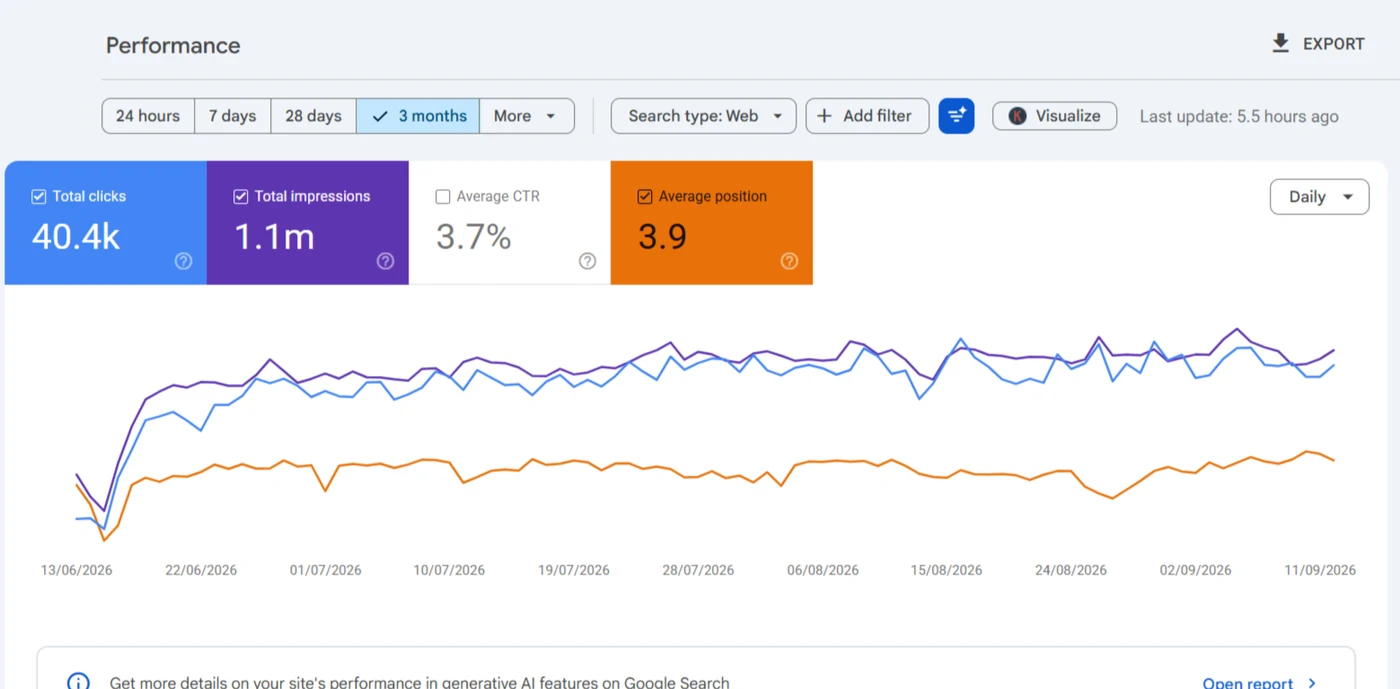
Here's what GK Jewelers found out in three days.
Which WordPress settings break SEO on launch day?
I check the live HTML in the first hour, because these travel from staging and won't show on a settings screen.
The staging noindex
'Discourage search engines from indexing this site' is ticked on most staging copies, and it's live the moment staging is.
Lost SEO plugin data
Titles, meta tags and canonicals live in post meta, and rebuilt pages lose years of edits.
Staging addresses left behind
Staging URLs in canonicals, links and the XML sitemap, which a live crawl catches.
Moving from Shopify, Wix or Squarespace to WordPress?
Each platform leaves its own URL patterns behind, and they don't match WordPress permalinks. Shopify has /products/, /collections/ and /blogs/news/, plus product URLs repeated under /collections/x/products/. Wix blogs sit under /post/, and Squarespace pages often carry a /blog/ prefix.
So a platform move is always a full URL change, and that's why the map's built pattern by pattern, then checked on every page that earns clicks. The Wix side is written up in moving Wix to WordPress.
What's in a migration SEO project, and what isn't?
A staging Disallow in robots.txt gets checked at launch; the file itself is covered on robots and sitemaps.
In this service
- A pre-launch baseline: top pages by clicks plus a crawl snapshot
- URL inventory from Search Console, sitemaps, a crawl and backlinks
- A redirect map with a destination rule per URL type
- Launch-day checks, plus Change of Address and Bing Webmaster Tools for a new domain
- Search Console monitoring with a written report
Not in it
- Copying files, hosting or building the new site
- Moves away from WordPress
- Problems that existed before the move
What happens after you book website migration SEO services?
- i.
A call about the move
What's changing, when it launches and who's building it.
- ii.
A fixed scope on Upwork
URL count, platform and any domain change set it, and you'll approve it before work starts.
- iii.
The map before launch
Every URL with impressions gets a destination, tested on staging for chains and loops.
- iv.
Launch day and after
Live checks in the first hour, then daily clicks by page until things settle.
What else do people ask about site migration?
How much do website migration SEO services cost?
The SEO share of website migration cost rests on URL count, platform and any domain change, so there's no price here. You'll get a fixed scope on Upwork after a short call, ideally weeks before launch.
What can go wrong in a website migration?
Old URLs left without redirects, redirects that all land on the homepage, a staging noindex going live, SEO plugin titles lost in a rebuild, and internal links still pointing at old addresses. Each one shows up as lost clicks on specific pages, which is why the baseline matters.
How do you migrate a website without losing SEO?
Map every URL that earned impressions to its closest new page before launch, test the map on staging, then check the live HTML in the first hour. A dip while Google recrawls is normal; a loss that doesn't come back means something in the map is wrong.
How long does SEO take to recover after a migration?
Google's site move guide says a medium-sized site can take a few weeks or more before the new URLs show instead of the old ones, and larger sites longer. A drop that started before launch belongs to penalty and drop recovery.
How long should 301 redirects stay in place?
Google's site move guide says as long as possible, generally at least a year, so signals and links can transfer. They don't cost much to keep, and removing them early isn't worth the risk.
Can a migration plugin handle the SEO side?
No. Duplicator and Migrate Guru copy files and the database, but they don't decide where a changed URL goes.
I've written the search side of a move up post by post. Start with the migration checklist I run before, during and after launch, then read the one that matches your move: moving WordPress to a new host, changing the domain, switching from Wix to WordPress or a redesign that renames pages. The rest are in the migration posts.
A move that only changes addresses on the same site still needs the same care: changing WordPress permalinks without breaking rankings covers the redirect map, and choosing between a 301 and a 302 covers the codes and the chains they leave behind.

Moving or redesigning your WordPress site?
Send me the site before launch if you can. I'll build the redirect map from every URL that earns impressions, test it on staging, and watch Search Console with you through launch week.
Book a call on Upwork