// services / stores, moves and recovery
WooCommerce SEO services built around the pages that sell
Your store makes thousands of URLs nobody wrote, from filters, sort orders, variations and tags, and Google spends its time there instead of on the pages that sell. Book a call and I'll show you where that's costing clicks.

// what it costs
- US$149Deep audit and growth report, one off, on Upwork
- US$999Audit and fixes, one off, on Upwork
- US$299 or US$750month to month, with a report every month
Audits from US$149, audit and fixes from US$999, and month to month plans at US$299 for maintenance or US$750 for growth. Booked and paid on Upwork.
What do my WooCommerce SEO services actually fix?
My WooCommerce SEO services fix what the store builds on its own: ?orderby= sort URLs, ?filter_color= filter URLs, tag archives, variation links and Product schema that disagrees with the page. That's where stores lose traffic, not in a missing meta description.
Anyone doing WooCommerce SEO should start in Search Console, and it's a mistake to start from a plugin's score. The Pages report shows how many URLs Google knows and why it skips them, and the Performance report shows which category pages already earn impressions. Your WooCommerce SEO strategy comes out of that gap. If you'd like to work through it yourself first, my WooCommerce SEO checklist is the order I use.
How would I diagnose this on your site?
This is the order I check it in on a WordPress or WooCommerce site, before changing anything. You'll get the findings back in writing, each tied to a number in your own Search Console.
See my full diagnosis process- i.
The Pages report against the product count
If Google knows ten times more URLs than you've got products and categories, filters and tags are eating the crawl.
- ii.
A crawl that follows parameters
Screaming Frog following ?orderby= and ?filter_ URLs shows which templates link to them and where their canonicals point.
- iii.
Product schema against the visible page
The Merchant listings report and live HTML show competing Product entities, or a price the shopper doesn't see.
Store crawled to death and categories stuck on page two?
Book a call on UpworkWhich WooCommerce URLs are wasting your crawl budget?
WooCommerce and its plugins create these without anyone deciding they're needed.
| URL pattern | What creates it | What I usually do |
|---|---|---|
| ?orderby=price | The sorting dropdown | Canonical to the clean category, with no internal links to sorted versions |
| ?filter_color=red | Attribute filter widgets | A filter with real search demand becomes a landing page; the rest stay out of the index |
| /product-tag/name/ | Product tags, often one per product | Noindexed or removed when they're thin copies of categories |
| ?attribute_pa_size=large | Links that preselect a variation | Canonical to the parent product URL |
What does WooCommerce SEO look like on a real store?
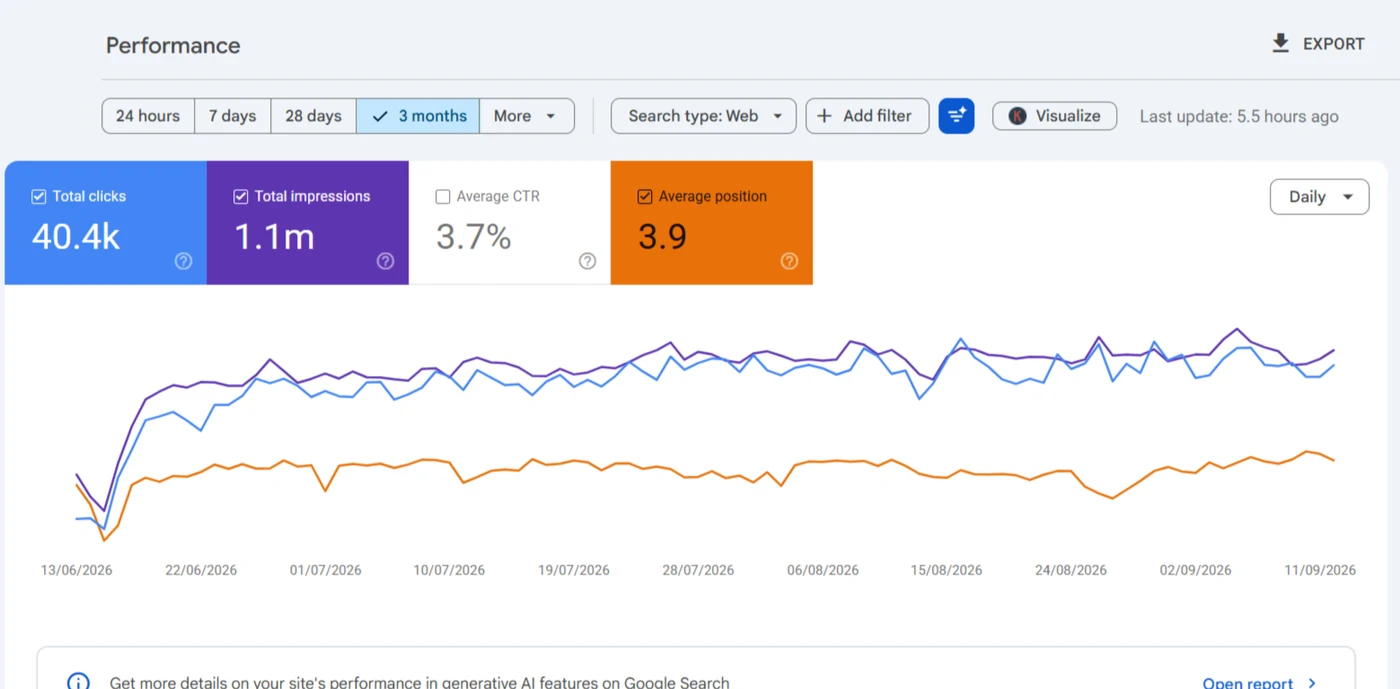
GK Jewelers runs a WooCommerce catalogue of more than 1,500 URLs, and it's the category pages that sell.
What does product page optimization cover on a store?
Product page optimization on WooCommerce starts with structure, and it's copy after that.
One product, one indexable URL
Sizes and colours belong on the parent product. A separate simple product for each creates near-duplicates that compete.
Honest stock signals
Items coming back stay live with the right availability. Discontinued ones redirect to a real replacement, stay live and marked Discontinued while people still search for them, or return a 410.
Schema that matches the page
One Product entity whose Offer shows the price, availability, shipping and returns the shopper sees, so Merchant Center and search don't disagree. Review stars only from real customer reviews.
How do WooCommerce category pages get to rank?
By being built as landing pages. The H1 matches the buyer's search, a short category description sits above the grid with a longer one below it, and breadcrumbs plus related products link every product back up to its category.
Faceted search creates near-copies of each category. In layered navigation, a filter combination people actually search, like a colour or a price band, earns its own indexable page; every other combination stays crawlable for shoppers and out of the index.
Is WooCommerce worse for SEO than Shopify?
No, and neither ranks better by itself. The trade is control. Shopify fixes the URL prefixes for you (/products/ and /collections/ can't be changed), and many themes link each product under its collection path too, so its duplicates are built in. WooCommerce lets you shape almost everything, which is also why it quietly produces the filter, sort and tag URLs above. If you're thinking of moving either way, that's a website migration with a full redirect map, not a settings change.
What WooCommerce gives you
- Your own permalinks, robots.txt, server and caching
- Any schema, filter or category setup the store needs
- The same WordPress site for content, guides and products
What it asks of you
- Decisions about which generated URLs Google should see
- Hosting and caching that can take a busy checkout
- Plugins kept in check, because each one can add URLs or markup
What's in a WooCommerce SEO engagement, and what isn't?
If you want a site-wide check, that's the technical SEO audit, and slow product templates are WordPress speed work.
In this service
- Filter, sort, price and search parameter handling
- Tag, variation and stock URL decisions
- Product schema cleanup matched to Merchant Center
- Category copy for queries the page already earns
Not in it
- Link building, ads or store design
- Permalink changes, which run as a site migration
- Shopify, Wix or other platforms, except moving off them
What happens in the first month after you book WooCommerce SEO services?
The order matters more than the calendar, because each step decides what the next one works on.
- i.
A short call about the store
Show me the categories that make money and the ones that should. I'll tell you if SEO isn't the real bottleneck.
- ii.
A fixed scope on Upwork
Store size, filter plugins and variations decide it, and you'll approve it before anything starts.
- iii.
Crawl waste and schema first
Sort, filter, tag and variation URLs settled, and Product markup matched to the page, so Google stops spending its visits on copies.
- iv.
Then categories at 3 to 20
Categories already sitting at positions 3 to 20 go next, because they're closest to paying back.
- v.
Numbers, not a report card
Every change is dated and measured in Search Console over four to eight weeks.
What else do people ask about WooCommerce SEO?
How much do WooCommerce SEO services cost?
There's no price here on purpose. A 200 product store and a 20,000 URL catalogue aren't the same job, so I send a fixed scope on Upwork after a short call.
Do I need someone for WooCommerce SEO, or just a plugin?
On a small store with one filter, a plugin's defaults can be enough. Once you've got faceted navigation or variable products, someone has to decide what gets indexed. An agency often splits that between people; here WooCommerce SEO consulting and the fixes come from one person.
How long before WooCommerce SEO shows results?
Canonical and noindex fixes usually show in Search Console within four to eight weeks as Google recrawls, and I don't judge a change sooner.
Which WooCommerce SEO plugin should a store use?
Whichever the store already runs, if it's set up well. Yoast's WooCommerce add-on, Rank Math and AIOSEO all handle the basics, and switching plugins carries its own risk to titles and redirects.
Three store jobs have posts of their own: writing product descriptions that aren't the manufacturer's copy, what happens to a product page when stock runs out and clearing Product snippet errors without fake reviews. They sit with the other WooCommerce posts.

Is your store ranking its category pages?
Send me the store URL and read-only Search Console access. I'll count the URLs WooCommerce created on its own, find the category pages sitting just off page one, and fix those first.
Book a call on Upwork