// services / structure and content
Content audit services for WordPress decided by 12 months of data
My content audit services put a year of Search Console clicks next to every indexable URL on your WordPress site and decide, page by page, what earns its place. Pruning isn't deleting whatever looks old. Book a call and I'll tell you whether your site even needs it.

// what it costs
- US$149Deep audit and growth report, one off, on Upwork
- US$999Audit and fixes, one off, on Upwork
- US$299 or US$750month to month, with a report every month
Audits from US$149, audit and fixes from US$999, and month to month plans at US$299 for maintenance or US$750 for growth. Booked and paid on Upwork.
What do content audit services do, and does your site need one?
A content audit lists every page Google can index, puts its search data next to it and decides what happens to it: keep, improve, merge, redirect, noindex or remove. Content pruning for SEO is the part that acts on those decisions. It's worth booking when most indexed pages earn no clicks in Google Search Console, or when 'Crawled - currently not indexed' keeps growing.
On WordPress the thin content is usually structural before it's editorial: tag archives, author archives on a one-author blog and empty WooCommerce categories become indexable URLs without anyone deciding they should.
How would I diagnose this on your site?
This is the order I check it in on a WordPress or WooCommerce site, before changing anything. You'll get the findings back in writing, each tied to a number in your own Search Console.
See my full diagnosis process- i.
Indexable URLs with no impressions
The crawl joined to a year of page data shows which pages Google hasn't shown once.
- ii.
Which templates the weak URLs come from
If most are tag, author or attachment pages, the fix is a plugin setting, not hundreds of edits.
- iii.
Backlinks and enquiries per candidate
A page with links or conversions keeps its URL, so it's improved or redirected instead of removed.
Hundreds of pages and most of them earning nothing?
Book a call on UpworkWhat does my content audit cover that a content inventory doesn't?
An inventory is the list of pages. The audit is the judgement on each one, and on WordPress that judgement needs four inputs, not a word count.
Search demand per page
Twelve months of impressions, clicks and queries from Search Console, joined to each URL, so a page's value is measured, not guessed.
Where the page came from
Post, page, product, category, tag, author or attachment template, because a setting often fixes hundreds of pages at once.
Reasons to keep it
Backlinks, enquiries, legal duties and seasonal demand, which protect a page that looks weak on clicks alone.
Overlap with other pages
Two pages splitting one query get merged, not both kept. You can check for cannibalization with my free tool before the call.
What does the content pruning process look like, step by step?
This is the page-level filter I actually run.
- i.
List every indexable URL
A crawl gives the URLs that return 200, are indexable and self-canonical.
- ii.
Join a year of page data
Any indexable URL missing from 12 months of Search Console data earned zero impressions.
- iii.
Take out anything with a reason to exist
Pages with backlinks, conversions, legal duties or seasonal demand come off the list.
- iv.
Read what's left
A spreadsheet can't tell a useful short page from a useless long one.
Which WordPress pages usually count as thin?
These are the page types I find most, and what I usually decide for each.
| Page type | How WordPress creates it | Usual decision |
|---|---|---|
| Tag archives | Every tag used once becomes its own URL | Noindex in Yoast or Rank Math, or remove and redirect |
| Near-empty location pages | A template with the town name swapped | Rewrite with local substance, or merge |
| Discontinued products | Out of stock items left published for years | Redirect to a replacement, or 410 |
| Unreviewed AI posts | Bulk drafts published without editing | Rewrite the few with impressions, remove the rest |
What do client sites show about thin pages and length?
Word count alone doesn't make a page thin. The Bright Pathways ABA homepage ranks at 9.9 on 151 words, and the case study still calls it thin because its H1 never says ABA therapy. Value decides, not length.
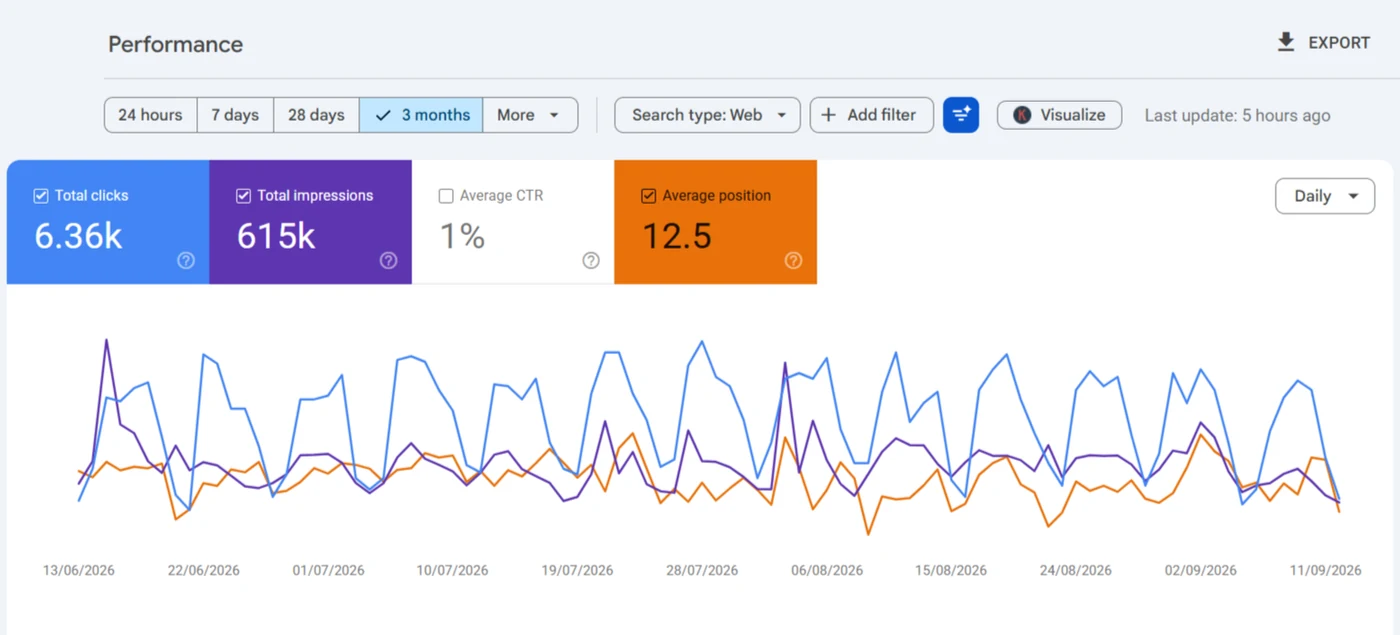
Thin by its case study's own verdict, because the H1 never names the service. Adding words wouldn't fix that; saying what the page is would.
Read the case study →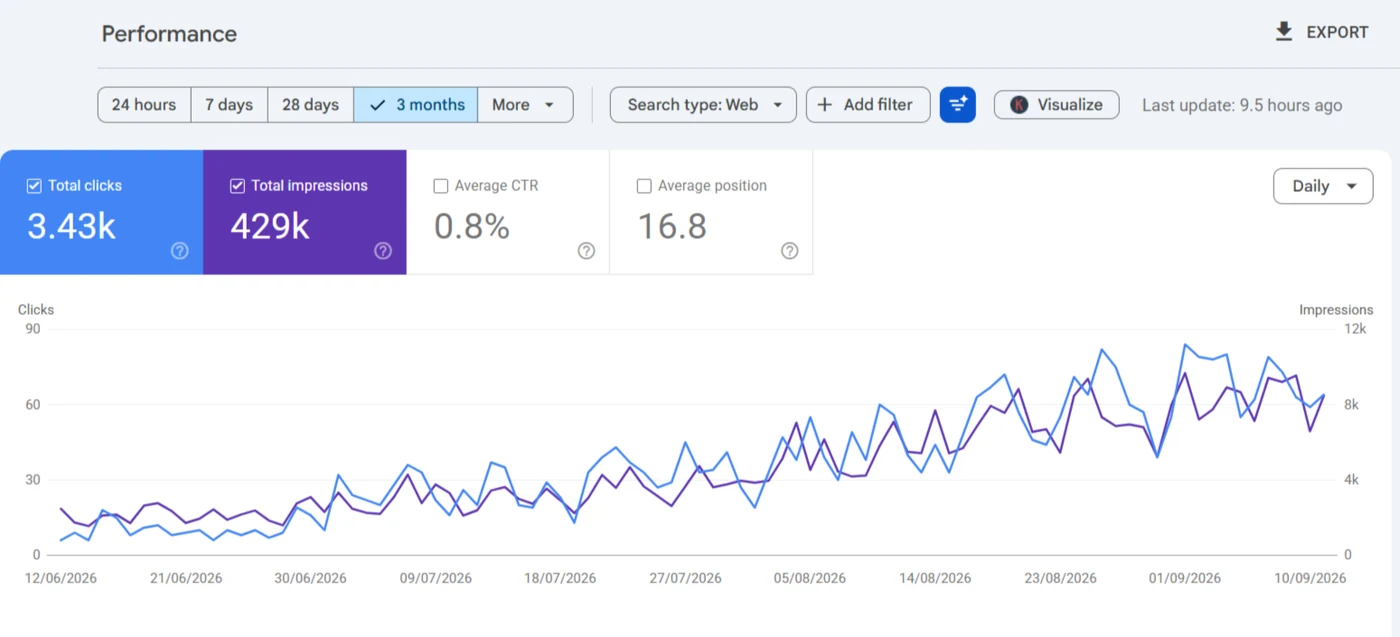
Picked at random, and more than half its 8-word runs still repeat on other town pages. Length didn't make it unique, which is why I read shared text, not word counts.
Read the case study →Merge, noindex or delete: which does each weak page get?
The wrong call throws away value or leaves the problem in place.
Merge and 301
When weak pages cover one topic, merge them into the strongest URL.
Noindex
When visitors need it but searchers don't, like thank-you pages.
Remove with a 410
When there are no links, no traffic and no replacement.
How does Google judge thin, low quality content?
Two ways. Algorithmically, the helpful content system became part of Google's core ranking systems in March 2024, and Google says unhelpful pages can weigh on how the rest of a site ranks, which is why pruning belongs in core update recovery once the dust settles.
Manually, a reviewer can issue the 'Thin content with little or no added value' manual action, which shows in Search Console's Manual actions report. That's rarer, and removing it needs a reconsideration request as well as the cleanup.
What's in a content audit and pruning project, and what isn't?
Two pages splitting one query need a keyword cannibalization service, and linking up the pages that remain is internal linking.
In this service
- Crawl and 12 months of Search Console data, joined by URL
- A written decision for every candidate page
- Archive noindex settings in Yoast or Rank Math
- Merges, 301s and 410s done in stages, with a baseline
Not in it
- Writing new articles or rewriting the whole blog
- Removing a manual action
- Link building to the pages that remain
What happens after you book content audit services?
- i.
An honest first answer
If your thin pages were never indexed, pruning won't do much, and I'll say so on the call.
- ii.
The export and the crawl
A year of page data joined to every indexable URL, with protected pages taken out.
- iii.
Decisions you approve on Upwork
Every candidate listed with its decision and reason, quoted before anything's removed.
- iv.
Changes in stages
Archives and merges first, removals last, each dated so the result can be read.
What else do people ask about content audit and pruning?
How much do content audit services cost?
They scale with the number of indexable URLs and how many need reading by hand, so there's no price listed. You'll get a quote on Upwork after the first export.
How long does a content audit take?
It turns on how many pages survive the data filter, because those are read by hand. The export and crawl are quick; the reading isn't. You'll get a date with the quote, once I've seen the URL count.
Does deleting pages improve SEO?
Sometimes. Deleting a page with zero impressions frees nothing, because it wasn't taking anything. Removal helps on sites with thousands of low-value URLs, not on small brochure sites.
Is a 410 better than a 404 for removed pages?
For Google the difference is small, since both end with the URL leaving the index. A 410 records that the removal was deliberate.
How often should you prune content?
Once properly, then every six to twelve months for most WordPress sites. I wouldn't prune straight after a core update, because pages that look dead often come back.
Two posts show the pruning calls in detail: what I do with WordPress tags and categories, and how I take a page out of Google once it's decided a page should go, including when I don't.

Too many pages doing nothing?
Send me the URL and read-only Search Console access. I'll join a crawl to 12 months of your data and sort every weak page into improve, merge, redirect or remove, with the reason written down.
Book a call on Upwork