// services / crawling and indexing
Google Search Console expert for WordPress pages Google won't index
A Google Search Console expert reads the Page indexing, Crawl stats and URL Inspection data, traces each excluded group to the WordPress setting, template or block behind it, and fixes that. I do it remotely, one site at a time. Book a call and I'll start with your report.

// what it costs
- US$149Deep audit and growth report, one off, on Upwork
- US$999Audit and fixes, one off, on Upwork
- US$299 or US$750month to month, with a report every month
Audits from US$149, audit and fixes from US$999, and month to month plans at US$299 for maintenance or US$750 for growth. Booked and paid on Upwork.
What does a Google Search Console expert fix on WordPress?
A Google Search Console expert turns the reports Google gives you into fixes on the site. On WordPress that means finding why service, product or location pages sit under Not indexed, whether it's a block, a duplicate, a missing internal link or a page Google doesn't rate, and changing the setting or template that causes it.
Discovered and Crawled, currently not indexed are the two labels that bring most people here, and they're symptoms, not diagnoses. I've written the full diagnosis in the guide to both statuses. This page is for when it's thousands of URLs, or your money pages, and you'd sooner hand the job to someone than work through it yourself.
How would I diagnose this on your site?
This is the order I check it in on a WordPress or WooCommerce site, before changing anything. You'll get the findings back in writing, each tied to a number in your own Search Console.
See my full diagnosis process- i.
The reason's URL export, grouped by template
Sorting excluded URLs into archives, products, locations and posts shows whether 400 URLs are one problem or several.
- ii.
URL Inspection on a sample per group
The Google-selected canonical and rendered HTML say whether it's a duplicate, a block or a page not worth keeping.
- iii.
Crawl stats response codes
403s, 5xx errors or slow responses point at a firewall, security plugin or host limit.
Your money pages stuck outside Google's index?
Book a call on UpworkWhich Search Console reports does the work cover?
Each report answers one question, and reading them together is what separates a diagnosis from a guess.
| Report | What it answers | What I do with it on WordPress |
|---|---|---|
| Page indexing | Which URLs are left out, and under which reason | Export each reason and group the URLs by template |
| URL Inspection | The canonical Google chose and the HTML it rendered | Test a sample per group before changing anything |
| Crawl stats | Response codes and times Googlebot got | Find 403s and 5xx errors from firewalls and hosts |
| Sitemaps | Which sitemaps Google read and what they listed | Match them to the URLs that should be indexed |
| Performance | Impressions and clicks per page and query | Check the fixed pages start earning impressions |
Which indexing status points to which WordPress fault?
The status strings are Search Console's own, so you can match your report line by line.
| Search Console status | What it means | What I check on WordPress |
|---|---|---|
| Crawled - currently not indexed | Fetched, judged, left out | Duplicate archives, thin templates, near-identical pages |
| Discovered - currently not indexed | Known but not fetched | Crawl stats response times and orphaned sitemap URLs |
| Excluded by 'noindex' tag | The page asked to be left out | Search engine visibility and SEO plugin post type settings |
| Soft 404 | A page Google reads as empty or missing | Empty archives, search results and out-of-stock products answering 200 |
| Server error (5xx) | Googlebot got an error | Firewall rules, PHP timeouts and host rate limits |
Why won't your WordPress website get indexed?
When a whole section won't index, it's usually one of these, and most take minutes to confirm. On a site that hasn't launched yet, the SEO plan for a new website catches all four before they happen.
A launch setting left on
Search engine visibility under Settings, Reading adds noindex to every page, and it's often still ticked weeks after launch.
A firewall blocking Googlebot
Security plugins and Cloudflare rules can hand Googlebot a 403. Crawl stats shows the codes it got.
Nothing links to the page
A page reachable only through the sitemap has no internal linking telling Google it matters.
Pages Google doesn't rate
Near-identical location or tag pages get crawled and passed over, and no setting changes that until the pages differ.
What does indexing work look like on real WordPress sites?
Two sites where indexing was part of the job, including the location build in the Scrap a Vehicle case study.
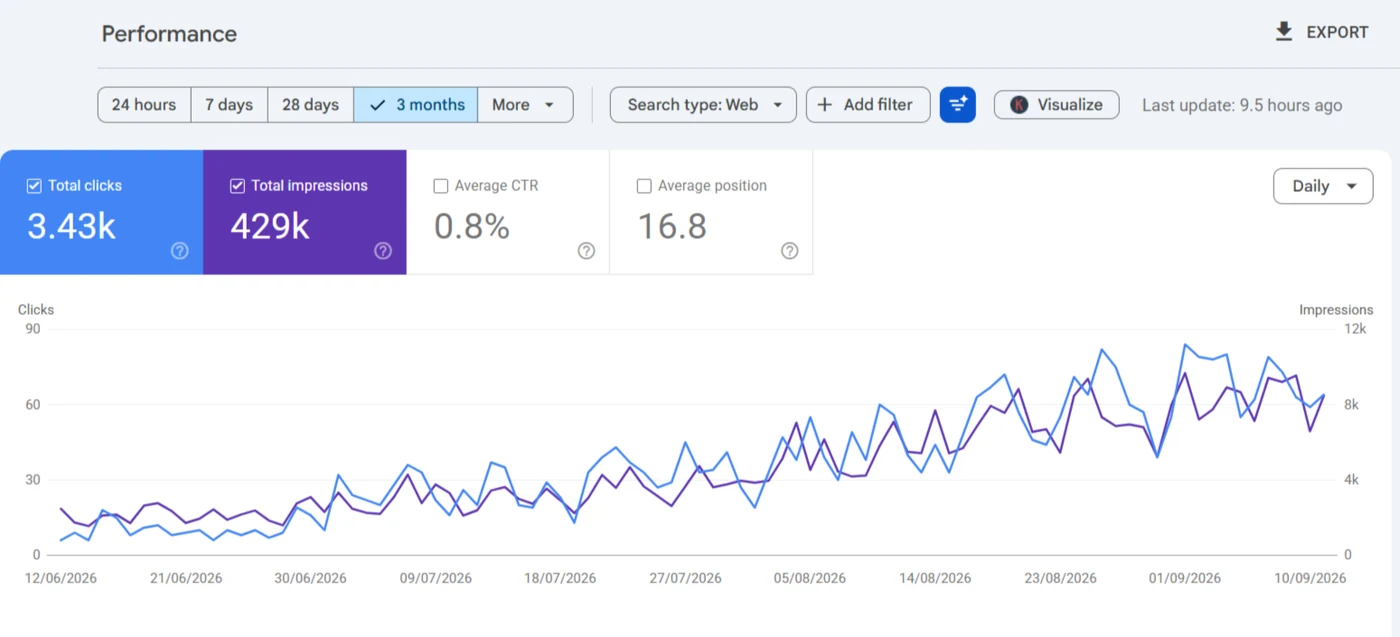
Split into 11 page sitemaps of up to 50 URLs, with clicks going from about 10 a day in June to about 70 in September 2026.
Read the case study →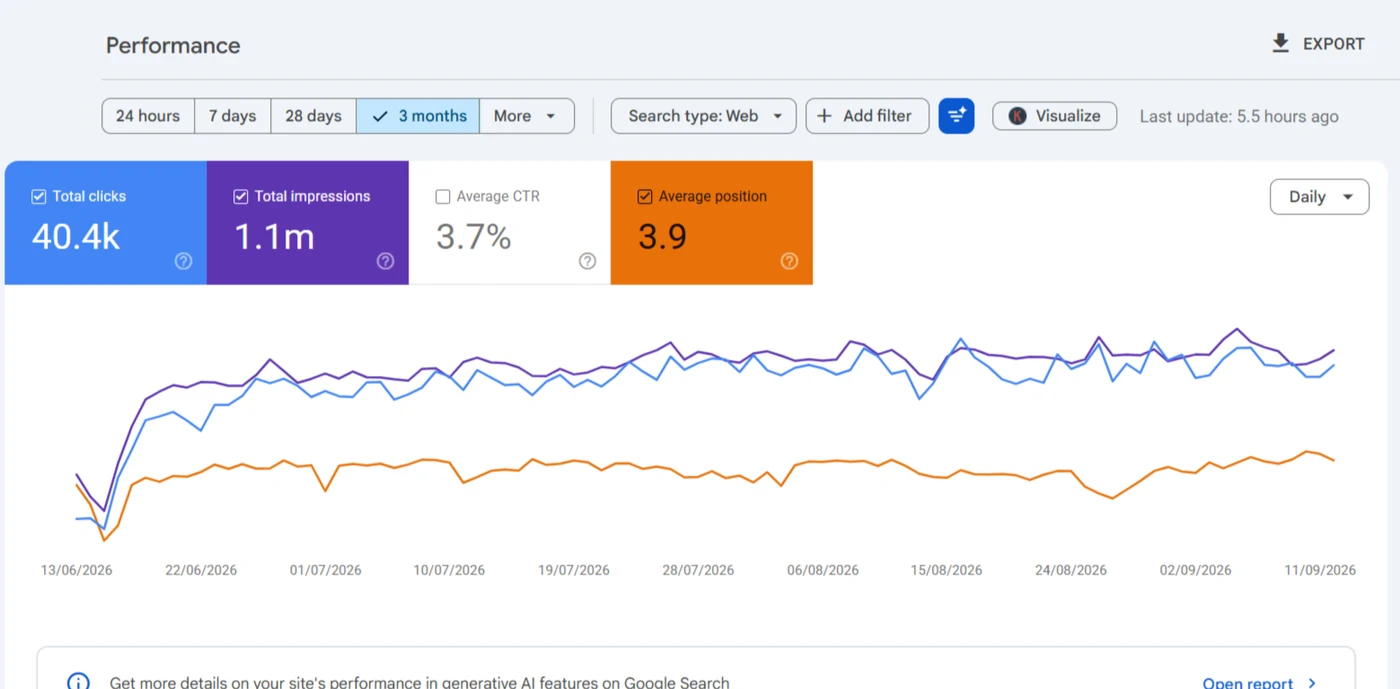
After the redesign, the corrected robots.txt and the resubmitted sitemap went in on the same day.
Read the case study →Why hire a Google Search Console expert when Request indexing exists?
Because the button doesn't fix causes. Request indexing asks Google to revisit one URL, and it doesn't touch crawl paths, canonicals, duplicate URLs, rendering, weak internal linking or whether the page was worth indexing in the first place. If the button were enough, you wouldn't be reading this page.
What does indexing work cover, and what's another service?
Crawl rule rewrites are robots and sitemaps work, and merging near-identical pages is duplicate content and canonicals.
In this service
- The Page indexing report read reason by reason
- URL Inspection samples per template
- Noindex, canonical and redirect settings in Yoast, Rank Math or AIOSEO
- Firewall blocks on Googlebot, and internal links to pages that should be indexed
- Property verification and sitemap submission, if nobody's done them
Elsewhere
- Rewriting the pages Google judged thin
- A traffic drop caused by a migration
- Manual actions and hacked-site cleanup
What happens after you book an indexing call?
- i.
A look at the Page indexing report
With read-only access, I'll see which reasons hold your important URLs before the call starts.
- ii.
Groups, not 400 separate problems
Excluded URLs are sorted by template, so the scope covers one fix per cause, not one per URL.
- iii.
A scope you approve on Upwork
The causes found set the work, and nothing starts until you've agreed it.
- iv.
Recrawl, then the report
Fixes are dated, and the Page indexing chart is read again once Google's recrawled the affected URLs.
What else do people ask about crawlability and indexing?
How much does fixing WordPress indexing cost?
That depends on how many causes sit behind the excluded URLs, not how many URLs there are. There's no price on this page; the scope and quote follow a short call.
What access does a Google Search Console expert need?
Usually a Restricted user, which Google describes as simple view rights on most data. If a report I need is closed to that level, I'll ask for Full. Changes happen in WordPress, so that access comes separately and only once you've approved the scope.
Is crawled, currently not indexed bad for SEO?
Not in itself, and a big Not indexed count is normal on WordPress. It's only a problem when the pages you sell from are the ones left out.
How long does it take Google to index a WordPress page?
There's no fixed time. A page linked from pages Google crawls often can be indexed within days, while one that's only in the sitemap can wait weeks.
Why was my indexing request rejected?
URL Inspection rejects a request when the live test finds a noindex tag, a robots.txt block or a redirect. On WordPress it's usually a staging noindex that survived launch.
Most indexing jobs start from one line in Search Console, and I've written up how I read the common ones: Excluded by noindex tag, Blocked due to other 4xx issue, soft 404s and Page with redirect. When a page just isn't there, this is how I work out why a site isn't showing up on Google. The indexing posts cover the rest.

Pages stuck in crawled, not indexed?
Send me the URL and read-only Search Console access. I'll group every excluded URL by its status, trace each group to the setting, plugin or template behind it, and tell you which groups actually matter.
Book a call on Upwork