// services / wordpress and woocommerce only
Technical SEO services for WordPress, one problem at a time
Technical SEO services fix the parts of a WordPress or WooCommerce site that stop Google crawling, rendering, indexing and understanding it: indexing, speed, schema, redirects and internal links. Each of the 20 below is one fixed-scope job, done by me, Muhammad Younus, a WordPress SEO consultant working remotely and booked on Upwork.
Which technical SEO service does your site need?
Start from what you're seeing, not from a service name. If more than one row sounds familiar, that's fine: the audit ranks them for you.
| What you're seeing | Where to start | Why |
|---|---|---|
| Traffic fell off a cliff | Penalty and drop recovery | The drop gets dated and diagnosed before anyone assumes a penalty |
| Pages stuck as crawled, not indexed | Crawlability and indexing | Each excluded group is traced to the setting or template behind it |
| A redesign or platform move coming up | Site migration | The redirect map gets built before launch, not after the drop |
| Store categories stuck on page two | WooCommerce SEO | Filter and sort URLs stop eating the crawl, and categories get worked on first |
| Search Console says pages are poor on speed | Core Web Vitals | Judged on the field data Google uses, not a lab score |
| The site is slow, and worst at checkout | WordPress speed | Server, caching, images and scripts get timed layer by layer |
| The wrong page ranks for your main search | Keyword cannibalization | One owner page per query, found in your own Search Console |
| Missing from ChatGPT and AI answers | AI SEO services | Crawler access gets checked before any content is rewritten |
| Not sure what's wrong at all | Technical SEO audit | A fix list ranked by the clicks each fault costs |
What are technical SEO services?
Technical SEO services are the work that makes a site readable to search engines before anyone judges its content. They cover crawling (can Googlebot reach the page?), rendering (does it see what a visitor sees?), indexing (does Google keep the page?), and understanding (do the canonicals, schema and internal links say what the page is?). Speed belongs here too, because Core Web Vitals are measured on the same pages.
That's different from on-page SEO, which is the words, titles and headings on each page, and from off-page SEO, which is the links and mentions that earn a site authority. Technical problems come first because they cap everything else: a page Google won't index can't rank for anything, however well it's written. If you'd like the plain-English version, here's what technical SEO is, the way I explain it to clients.
On WordPress, the causes are usually specific. The theme, the page builder, the SEO plugin, the cache and WooCommerce all write into the same HTML, robots.txt, sitemap and schema, and most faults are two of them disagreeing.
What's in these technical SEO services, and what isn't?
Everything on the left is diagnosed and fixed by one person. Everything on the right is work I don't sell, so none of it gets padded into a quote.
In scope
- Crawling, indexing, canonicals, robots.txt and XML sitemaps
- Core Web Vitals and WordPress speed, judged on field data
- Schema markup, internal links and duplicate or thin pages
- WooCommerce catalogues, migrations and traffic drop recovery
- Local SEO on the website side, and AI search readiness
Not in scope
- Link building, guest posts and digital PR
- Paid ads and social media
- Sites that aren't on WordPress and aren't moving to it
- Ranking guarantees of any kind
What do technical SEO fixes find on WordPress?
Six faults I see again and again. None of them shows on the front end, and each one shows clearly in a crawl or in Search Console.
Crawling and indexing
Speed and rendering
Structure and content
Stores, moves and recovery
AI search
What have these services done on live sites?
Three results, each from the client's own Search Console with the window it was measured over. All 8 case studies also show the number that isn't good yet.
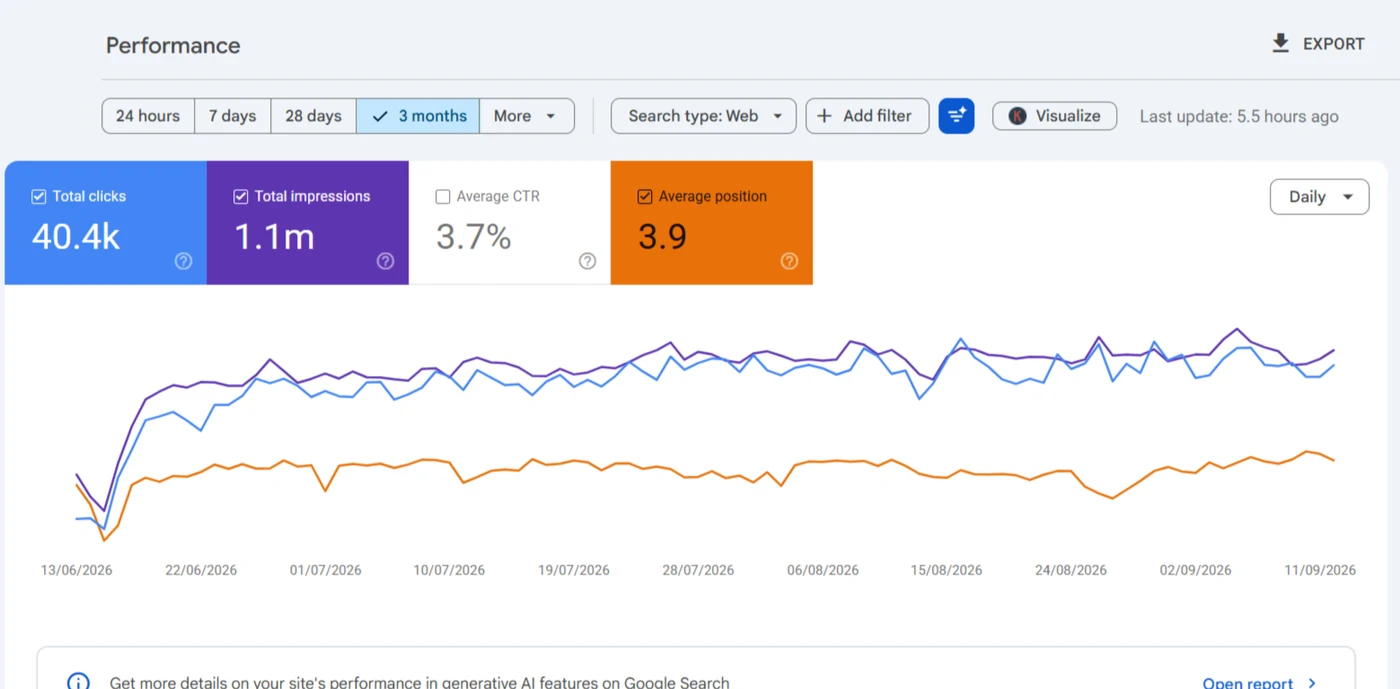
A redesign shipped without a redirect map. The redirects, then category and product page work, put the store back above its old line, at average position 4.0.
Read the case study →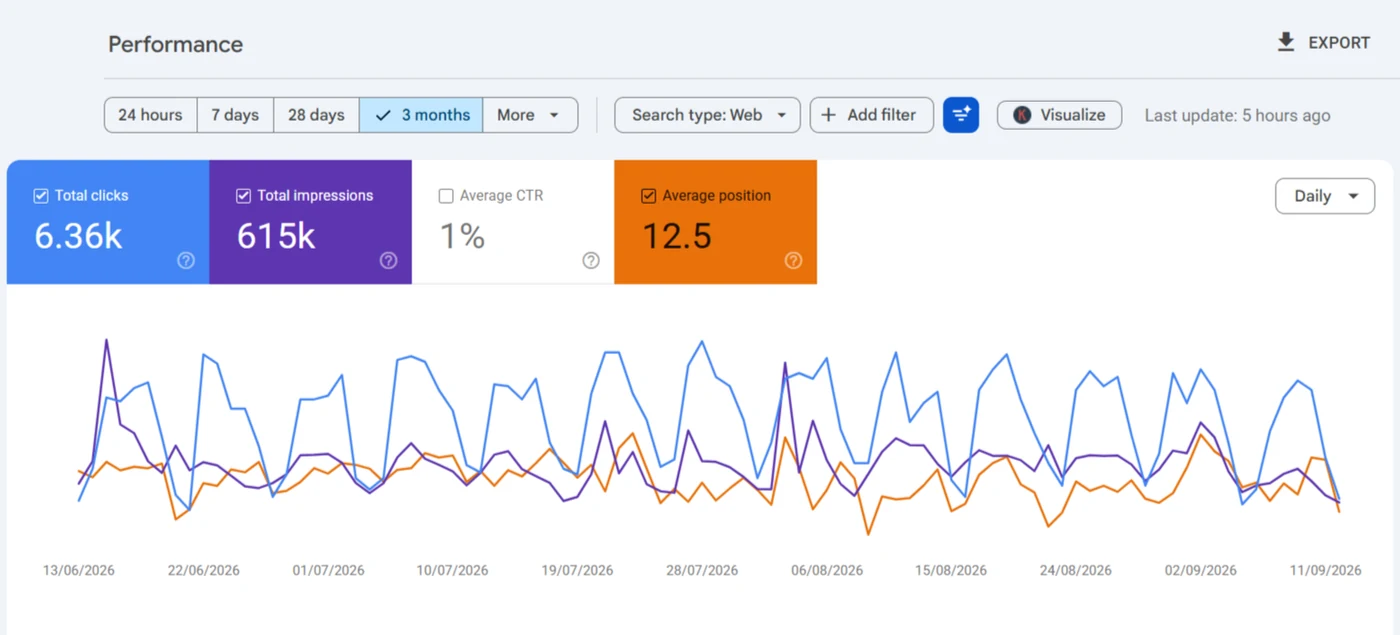
Location pages across the towns the practice serves, built in WordPress, with the brand holding position 1.1.
Read the case study →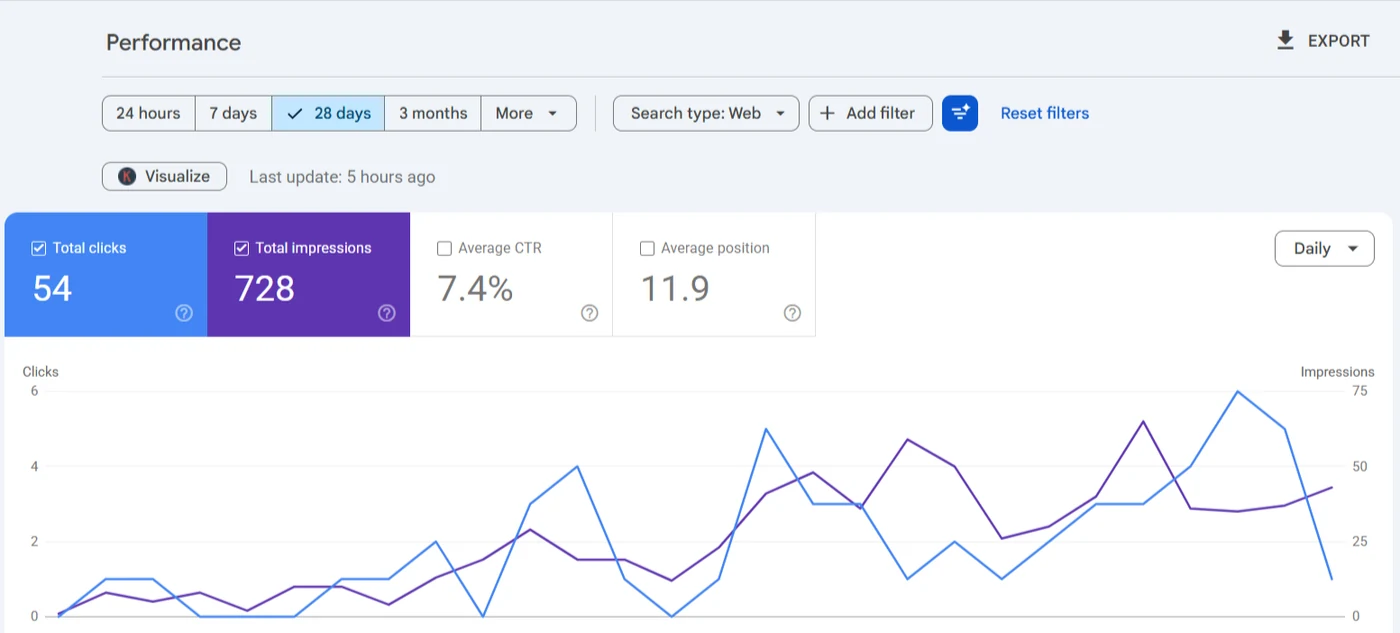
A new WordPress site launched on 9 August. The titles and descriptions matched what people search from the first month.
Read the case study →How long do technical SEO services take to work?
Redirect and indexing fixes can show within days. When GK Jewelers' redirects went in, daily clicks went from 49 on 15 June 2026 to 362 on 20 June. Most other technical changes need four to eight weeks before they're worth judging, because Google has to recrawl and re-evaluate each page first.
Speed takes longest to prove. The Core Web Vitals report runs on real visits collected over time, so a fix that's live today shows up in field data weeks later, not on the day. I'll tell you which of these to expect before the work starts.
How does booking a technical SEO service work?
Book a short call
Tell me what's wrong and share the URL. If none of these services fits your problem, you'll hear that on the call.
Get a fixed scope
The work, the order and the price go on Upwork before anything starts, and payments stay in milestones.
Judge it in Search Console
Every change is dated and compared against a baseline after four to eight weeks, in clicks, not scores.
Why hire one consultant for technical SEO?
A bigger firm usually sells a bundle and a monthly report. These services aren't that: they're single problems, fixed by the person who found them. You'll find what to send first on the contact page. The posts on how I fix WordPress SEO show how I handle each job, and the industry pages show which of these matter most in your trade.
What you usually buy
- A retainer covering content, links and a ranking report
- An account manager between you and the specialist
- A plugin score instead of a list of fixes
- Social media, email marketing and ads added to the bill
What you get here
- One fixed scope per problem, quoted on Upwork
- The person who diagnoses the site is the one who'll make the fix
- A before and after report you'll read in your own Search Console
- No link building, paid ads or web design, so none gets padded in
Technical SEO services, your questions
Which technical SEO service should I start with?
If you don't know what's wrong, start with the technical SEO audit. It ranks every fault by the clicks it costs, and the other services pick up from that list.
How much do technical SEO services cost?
The technical SEO audit is $149 and the audit with its fixes is $999, the same figures as the homepage and the terms. The rest are quoted as a fixed scope after a short call, because a 20 page site and a 5,000 product store aren't the same job. There's no hourly meter running.
Is SEO still worth it now that AI answers exist?
Yes. ChatGPT, Perplexity and Google's AI Overviews quote pages that search engines can already crawl, index and trust, so the technical work that ranks a page is the work that gets it cited. I wrote up whether SEO is worth it for your site, AI answers included.
Can ChatGPT do technical SEO?
It can explain an error or draft a title. It can't see your Search Console, crawl the site the way Googlebot does, or change what your theme and plugins output, and that's where technical problems live. A chatbot's guess is a starting point, not a diagnosis.
Which SEO plugin is best for WordPress?
Rank Math and Yoast both do the job, and I work in both. The settings matter far more than the logo: most of the problems I find come from defaults nobody changed. I've written up how I choose between Rank Math and Yoast.
Can you do more than one of these on the same site?
Yes, and most sites need two or three. They're scoped in the order the audit ranks them, so the biggest leak gets fixed first.
Do you work on sites that aren't WordPress?
No. Shopify, Wix and Webflow only come up as the origin of a move to WordPress, because WordPress and WooCommerce are the platforms I know down to the template files.

Book a call. I'll tell you which.
Most sites don't need all of these. Book a call on Upwork, share the URL and read-only Search Console access, and you'll get back the two or three problems that are actually costing clicks, with nothing padded around them.
Book a call on Upwork